Before you start
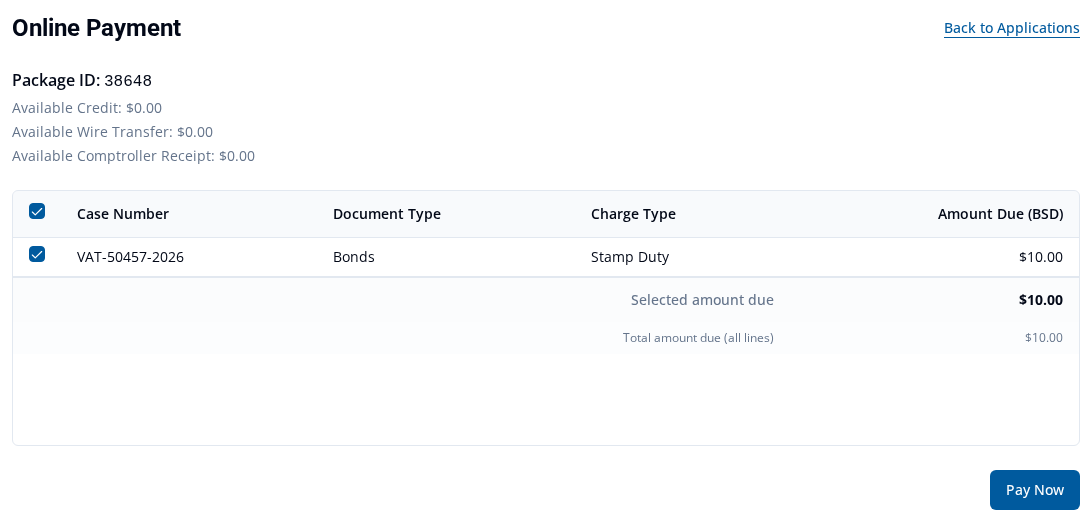
You pay VAT Stamp charges by card from the package's Online Payment page. The page lists each charge in the package. A charge can be selected only when it is ready for payment.
Pay by card
- Select Applications on the top navigation bar.
- Find the submitted case. Find draft and submitted applications explains the search.
- Open Package View.
- Select Make Payment. The package's Online Payment page opens.
- Review the charge rows and the amounts under Amount Due (BSD).
- Select the checkbox for each eligible charge you want to pay.
-
Check Selected amount due. This is the amount for the selected rows. Total amount due (all lines) is the amount due for all rows, including rows that are not selected.
- Select Pay Now.
- In Payment, select Online Credit Card as the Payment method.
-
Check the Currency and Amount.
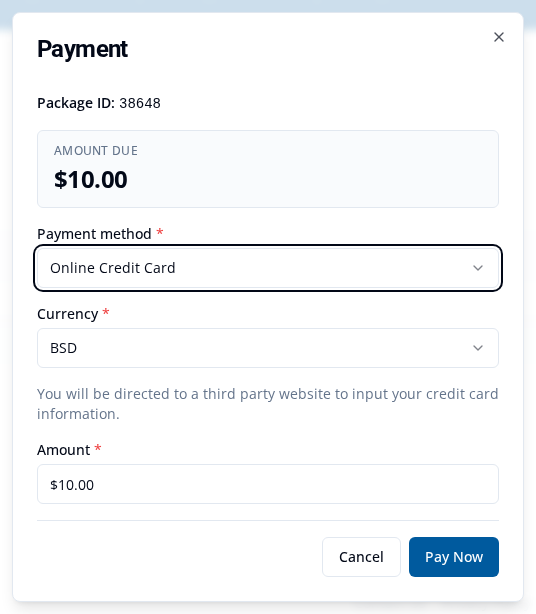
- Select Pay Now. You will go to a third-party website to enter your card details.
- Follow the instructions on that website to complete the payment.
This example shows one Bonds charge. Your package lists its own charges.
What happens next
VAT Stamp shows the payment result after the third-party site returns you to the service. If the payment is successful, you can view or download its receipt.
View or download payment receipts covers receipts.