Before you start
If an officer sends an application back, the portal shows it as Returned. The case moves to Submitter Revision. Returned is how you find the work. Submitter Revision is the status you see on the case itself.
The officer's return instruction tells you what to change. The case does not go back for review until you submit the revision.
Revise and resubmit
-
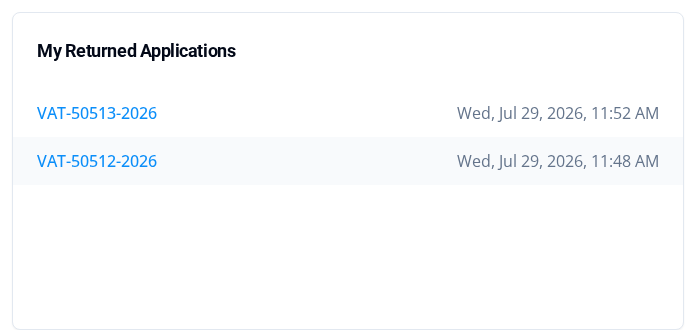
Open My Returned Applications on the dashboard and select the returned case number. You can also filter the Applications page by the Returned status. Find draft and submitted applications explains searching.
-
Read the officer's return instruction on the case, and make each requested change.

- Update the documents the officer asked you to change. In Document Information, select Update on a document's row to replace its file. Add Additional Supporting Document adds another file where it appears. Document changes do not resubmit the case. It stays in Submitter Revision until you submit the revision.
- Select Submit Revision.
-
Enter a note in Note that explains what you changed. The note is required. An empty note shows Note is required.
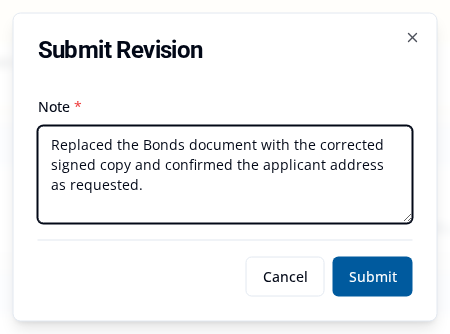
- Select Submit.
- Check the case's Case Status. It changes to Approver Review. You may also see Revision submitted and Your application has been returned for approver review. Use the status as your proof, because the message disappears.
If a revision action does not work
Check that you are signed in and can open the case. Check that it still shows Submitter Revision. Revision actions stop once the case leaves that status. If the form shows Note is required, enter your note and select Submit again.
What happens next
The case goes back to Approver Review, and the officer reviews your changes. The case also leaves My Returned Applications once the revision is submitted.