Before you start
The public Case lookup page gives you a quick, limited summary of a completed VAT Stamp case. You do not need to sign in.
A stamped document may include a QR code that opens this page.
Check the completed case
- Check that the page heading is Case lookup.
- Compare Case # with the case number you expect.
- Compare Document type with the type of document you expect.
- Check that Status is Completed.
-
Compare Total amount and Completion date with the information you expect.
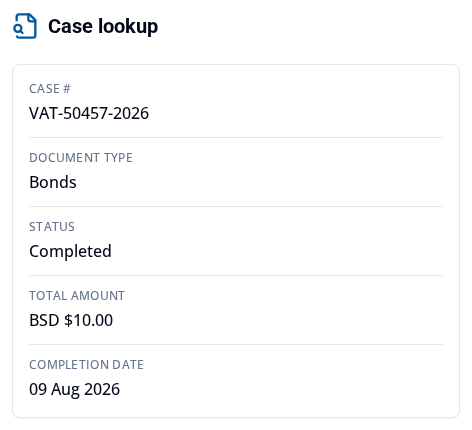
The page gives a limited check of the completed-case summary. Total amount does not tell you whether an amount was paid, is due, or remains outstanding. The result does not download a document or prove legal validity, payment, or file integrity.
If the case is not found
If the page shows Case not found this only means that the public check did not return a completed-case summary. It does not tell you whether the case number is missing or the case is still incomplete.
What happens next
If any detail is unexpected, check the case number with the person or organization that supplied the document.
To get a stamped document from a case you can access, see Download a stamped document.