Before you start
You can submit a wire transfer online and use it after it is approved. You can only view and use a transfer that you submitted.
Have these details ready:
- receipt number
- amount and currency
- account number
- the case or parties the transfer is for
- a PDF copy of the receipt
Submitting the form starts a review. It does not pay a charge.
Submit a wire transfer
- Select Transactions on the top navigation bar.
- Select Wire Transfers.
- Select Add Wire Transfer.
- Enter the Receipt number.
- Enter the Amount.
- Select the Account number. thje currency will be automatically populated based on the Account number you select.
- In Note, state the case or parties the transfer will be used for. This Note will help you distinguish one wire transfer from another if you have multiple clients with wire trasnfers to be expended.
-
Under Receipt, upload the PDF receipt.
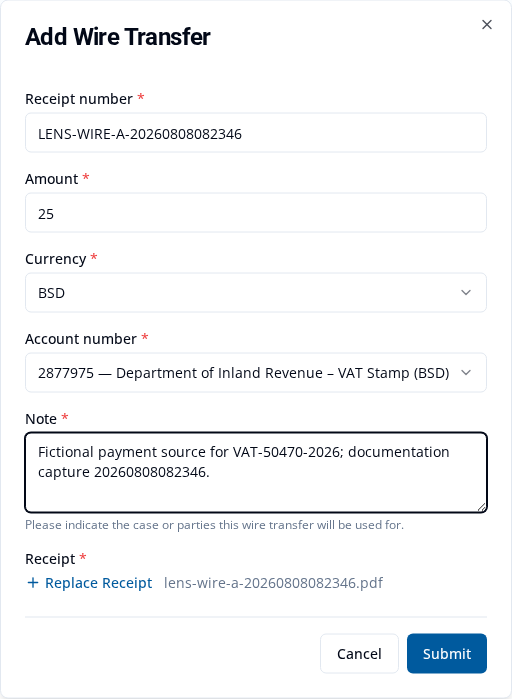
- Check the details.
- Select Submit.
VAT Stamp shows Wire transfer submitted. The transfer has the status Unreviewed while it waits for review.
Fix or withdraw a transfer
If the status is Revision Required, open the transfer and read the reason. Update the requested details, replace the receipt if needed, then select Submit. The status returns to Unreviewed while the changes are reviewed.
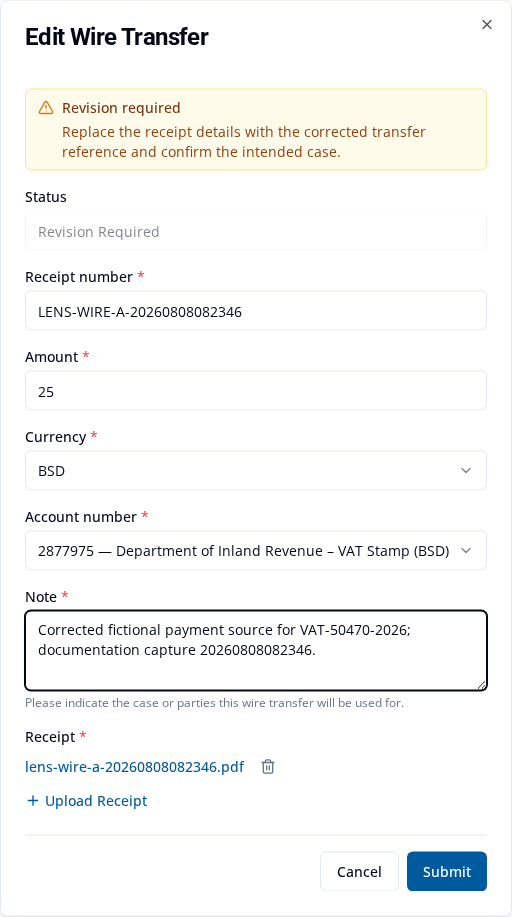
You can withdraw a transfer while its status is Unreviewed or Revision Required:
- Find the transfer under Transactions > Wire Transfers.
- Select Withdraw.
- In Withdraw wire transfer? pop-up confirm the withdrawal.
VAT Stamp shows Wire transfer withdrawn. Its final status is Withdrawn.
Use an approved wire transfer to pay
Wait until your transfer has the status Approved. Its Balance is the amount still available to use.
- Select Applications on the top navigation bar.
- Find the submitted package. Find draft and submitted applications explains the search.
- Open Package View.
- Select Make Payment.
- Select each eligible charge you want to pay.
- Select Pay Now.
- In Payment, select Wire Transfer as the Payment method.
- Under Wire transfer, select your approved transfer.
-
Check the Amount.
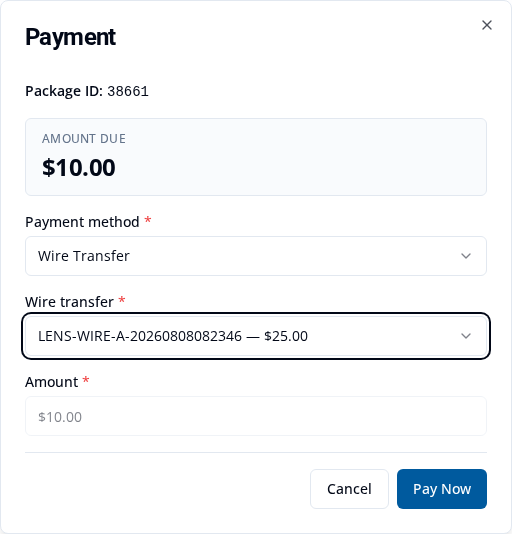
- Select Pay Now.
VAT Stamp shows Payment recorded with the payment number and amount.
The transfer and charge must use the same currency. You can use the transfer only for charges that are in Payment Processing.
Check the payment and balance
Return to Transactions > Wire Transfers. The Balance is reduced by the amount you paid.

For example, an approved BSD $25.00 transfer used to pay a BSD $10.00 charge has a BSD $15.00 balance. Your amounts may be different.
You can also view or download the payment receipt.
If the transfer is not available
Check that:
- the transfer has the status Approved
- its Balance is more than zero
- the transfer and charge use the same currency
- the charge is ready in Payment Processing
If the transfer has the status Revision Required, follow the reason shown and submit it again. You can also pay VAT Stamp charges by card.