Before you start
Some document types ask document criteria questions inside the application form. The questions appear only when they apply to your document type. Not every application shows them.
Your answers matter. They shape which supporting documents the application expects from you.
Each group of choices tells you how to answer it:
- A radio-button group allows one answer. Choose one.
- A checkbox group allows several answers. Tick every one that applies.
Answer only the questions and choices shown for your application.
Example: Upstamping criteria
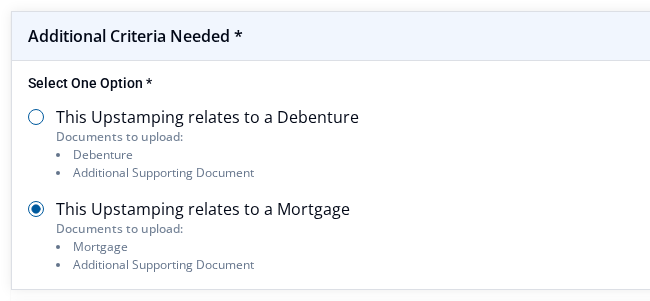
One live Upstamping application shows an Additional Criteria Needed section. Inside it is a Select One Option group. The group has two radio choices:
- This Upstamping relates to a Debenture
- This Upstamping relates to a Mortgage
Each choice shows its own Documents to upload: list under it. The Debenture choice lists Debenture. The Mortgage choice lists Mortgage. Both also list Additional Supporting Document.
This is one document type only. Your application may ask different questions and expect different documents.
Answer and save
- Read each criteria question shown for your application.
- Choose one answer in a radio-button group.
- Tick every answer that applies in a checkbox group.
- Note any Documents to upload: list shown with your answer. Treat each listed document as required unless the screen says it is optional. Upload supporting documents explains the upload.
- Select Save as Draft. Save an application as a draft explains saving.
What happens next
Your latest saved choices are stored with the application. They appear again when you reopen it.
Your criteria answer can require a document. If that document is missing, the application may not become Ready To Submit. Fix issues that block Ready To Submit explains how to find and fix what is missing.