Before you start
Ready To Submit is the readiness state of one application. It tells the portal that this application is complete. It does not submit the application or its package. You submit the whole package later, once every application is ready.
Make the application ready
- Open the application from Draft Applications.
- Complete the information the form asks for. For help, see Complete fields for your document type.
- Answer the criteria questions shown for your document type.
- Upload the required supporting documents. For help, see Upload supporting documents.
-
Select Ready to Submit at the bottom of the form.

-
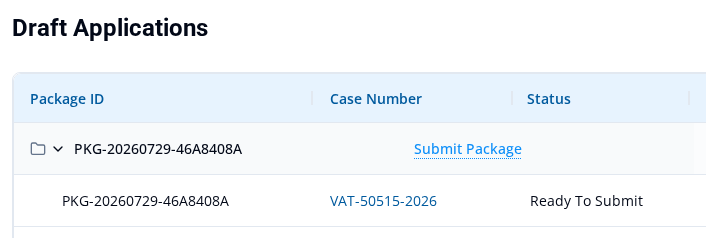
Check the application in Draft Applications. The portal returns you there after a successful attempt. A ready application shows Ready To Submit in the Status column.
If the attempt is blocked
If an item is missing or invalid, a red Validation Errors banner appears on the form. The application stays in Draft status. Your entries remain. Fix the listed issues and select Ready to Submit again. For help with the messages, see Fix issues that block Ready To Submit.
What happens next
Ready To Submit applies to one application at a time. When every application in the package is ready, Submit Package becomes available. You find it on the package row in Draft Applications. While any application is still Draft, the package cannot be submitted.
Ready is not a lock. If you edit and save a ready application, it can return to Draft. Make it ready again before you submit the package.