Before you start
Use this guide for Affidavits of Loss.
You must always:
- choose the type of instrument that was lost.
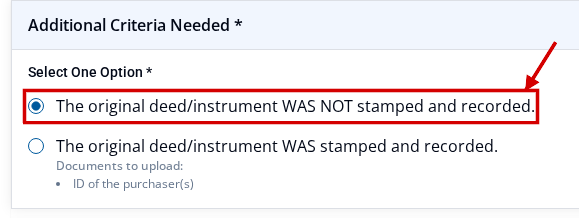
- choose whether the original instrument WAS or WAS NOT stamped and recorded.
- add the Affidavits of Loss PDF under Primary Attachments.
The last choice changes which questions and support files may apply. Follow the rules shown after you choose the lost type.
Complete the application
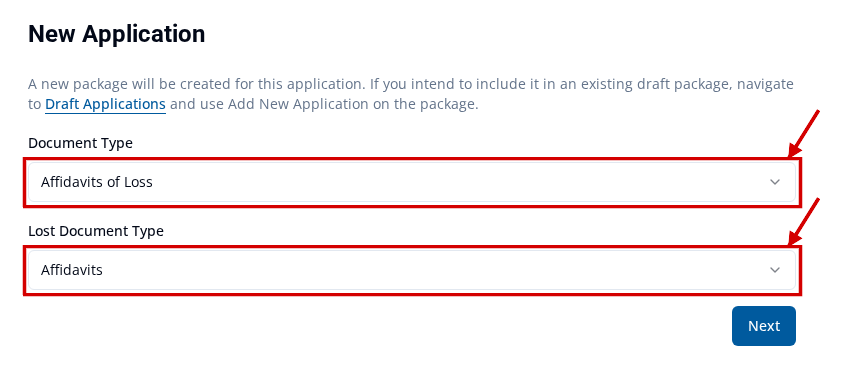
- Start a new application. Under Document Type, choose Affidavits of Loss.
-
Under Lost Document Type, choose the type of instrument that was lost. You must choose a type before you continue.
-
On the form, find Additional Criteria Needed. Choose whether the original instrument WAS stamped and recorded or WAS NOT stamped and recorded.
- Fill in all fields and answer all questions shown for your choices. Complete fields for your document type explains the fields. Answer document criteria questions explains the questions.
- Under Document Information, add the Affidavits of Loss PDF under Primary Attachments. Both stamped choices need this main file. For upload steps, see Upload supporting documents.
- Use the matching rule below to check Secondary Attachments.
- Finish every field and file marked as required. Then follow Mark an application Ready To Submit.
If the original WAS stamped and recorded
Use the Affidavit of Loss rules shown on the form. A Lost Document may be marked as required. Other items may also be marked. This can include applicable identification. Upload each required item.
If the original WAS NOT stamped and recorded
The lost type sets the extra questions and support-file rules. A separate Lost Document is not required just because the form is for an Affidavit of Loss. Answer all questions and upload all files marked as required.
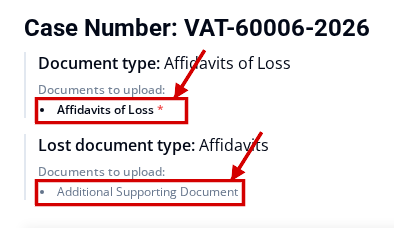
For example, if the lost instrument type is Affidavits:
- the Affidavits of Loss primary PDF is still required.
- no separate Lost Document upload is required.
- Additional Supporting Document is optional.
- the form can reach Ready To Submit with no secondary upload.
If you choose another lost type, use the rules shown for that type. For example, you may choose Release of Dower. Answer its questions and upload each required support file shown. Do not use one list for every lost type.
If the application is not ready
Check every field and file marked as required. Fix issues that block Ready To Submit explains how to find a missing item.