Applications live in a package
When you start your first application, the portal creates a package around it. The package is the container. Each application is a form inside it. Related applications can share one package. You submit the package, not the application.
Start a new VAT Stamp application begins the journey. Add another application to a draft package grows the package.
Until you submit, everything stays under Draft Applications. Your work there stays editable. Save an application as a draft covers saving. Find draft and submitted applications explains the two areas.
Ready To Submit is not submitted
Each application moves from Draft to Ready To Submit when it is complete. Ready means it can go with the package when you submit. Nothing has been sent yet.
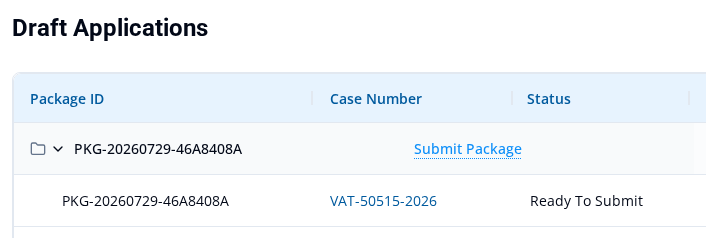
Every application must be ready before the package can be submitted. Mark an application Ready To Submit explains readiness, and Fix issues that block Ready To Submit helps when an application cannot become ready.
Two points save the most confusion:
- If you edit and save a ready application before you submit, it can return to Draft. You may need to mark it ready again.
- Selecting Submit Package is the moment of submission. It sends the whole package.
After you submit
Your work moves to Applications and opens read-only. Each submitted application becomes a case. You can follow its progress through the stages shown on the case, from Assign Officer through Completed.
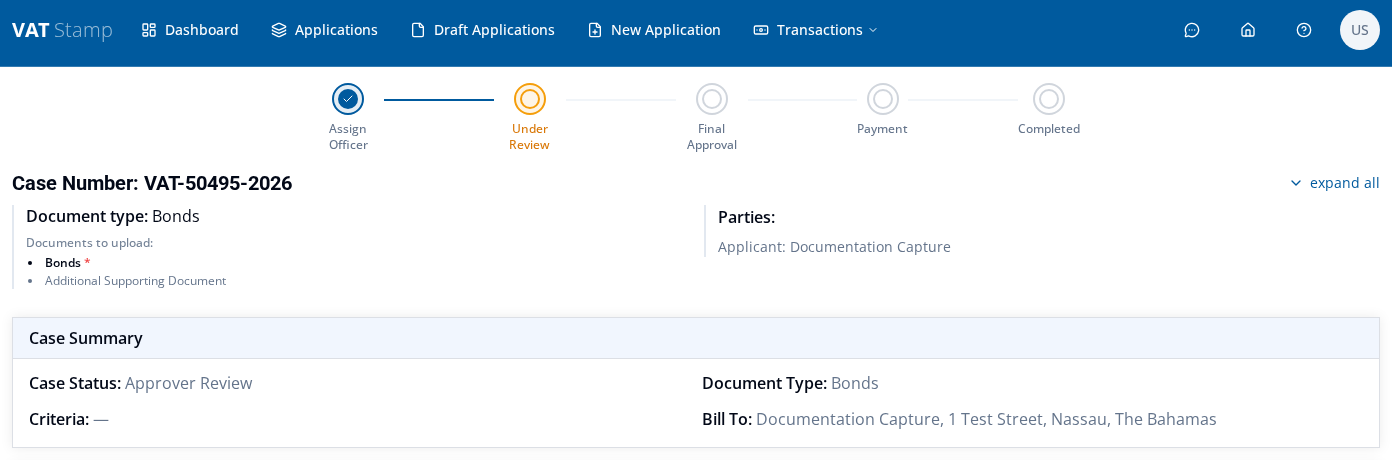
The journey may still need you:
- A case can be returned to you for changes. Revise and resubmit a returned application shows where returned work appears and how to send it back.
- Payment has its own stage. Pay VAT Stamp charges by card covers paying.
- The stamped document is the outcome you collect at the end. Download a stamped document explains the download.
Check the portal for these steps. Do not rely on email alone, because message receipt is not guaranteed.